Run your Crewdesk from a conversation with Claude or ChatGPT
Connect Crewdesk to Claude or ChatGPT and ask in plain words: what's overdue, what's on your plate, create a task, message a teammate, invite someone. Your assistant does it as you, with exactly your permissions.
Free with every Crewdesk account.
How many tasks are overdue?
Checked Crewdesk
3 tasks are overdue in Northwind Studio:
- WEB-14Fix the contact form's spam filter3 days late@sara
- DES-8Send final logo files to Northwind2 days late@omar
- OPS-21Renew the domain and SSL certificate1 day late@maya
The oldest is WEB-14, assigned to @sara. Want me to move any of them to this week?
Works the same inClaudeChatGPT
Just ask
A few things people ask once Crewdesk is connected.
- “How many tasks are overdue?”
- “What's due for me this week?”
- “Create a task in Website: ‘Update the pricing page’, assign it to @sara, due Friday.”
- “Mark DES-12 as done.”
- “Message @omar: the client call moved to 3pm.”
- “Invite x@y.com to my workspace as a member on the Website project.”
What your assistant can do in Crewdesk
Answer questions about your work
How many tasks are open, overdue or due this week, across a workspace, one project or just yours. Lists filtered by status, assignee or due date.
Create and update tasks
New tasks with assignees, a due date and a priority. Move a task to done, change its title or due date, add or remove people.
Message your team
Send a direct message, post in a channel or reply in a thread, as you.
Invite people
Invite by email or @handle, with a role and the projects they should join. Owners and admins only, as in Crewdesk.
Set up in under a minute
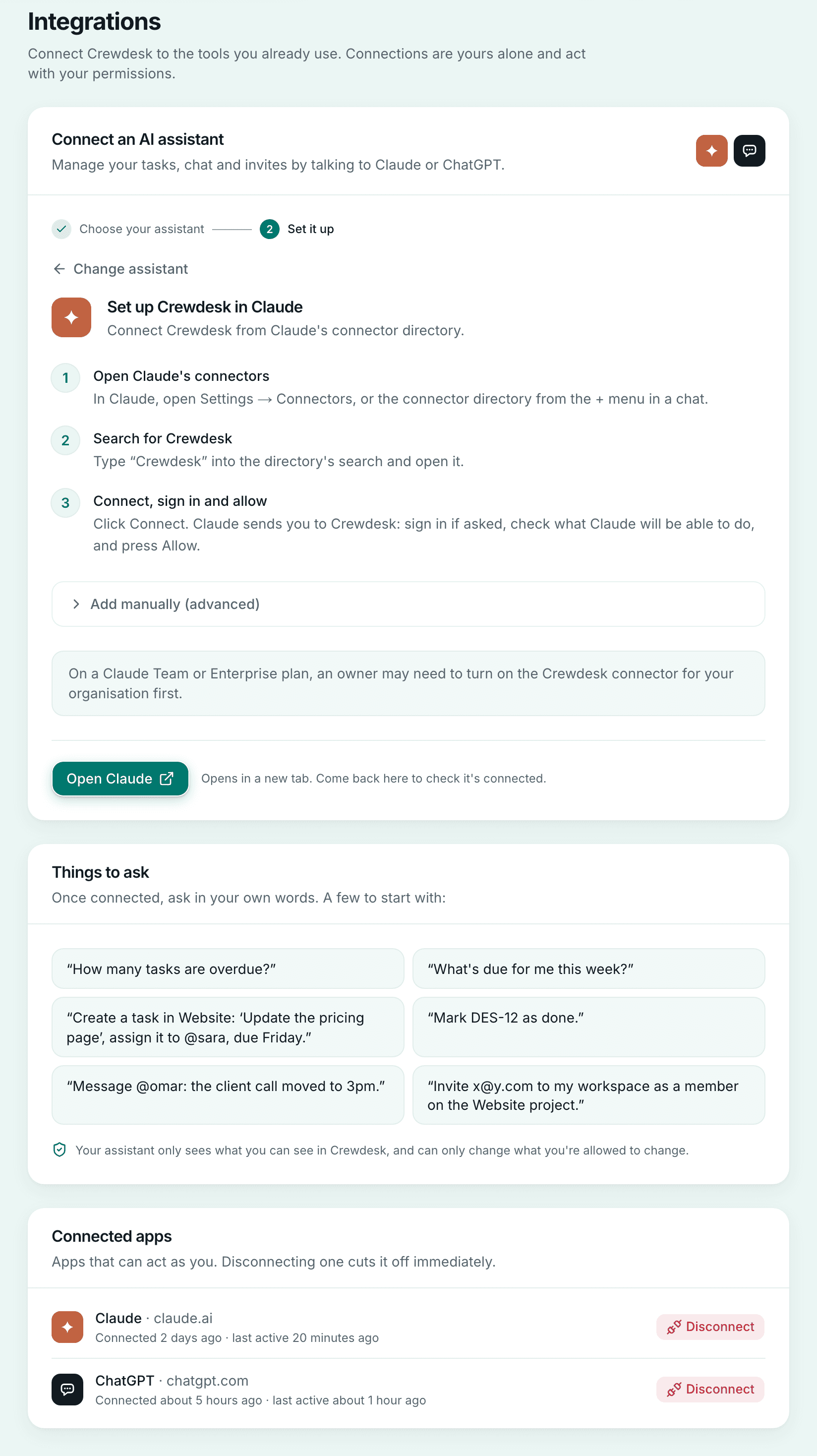
Settings → Integrations in Crewdesk asks which assistant you use and walks you through it — Claude from its connector directory, ChatGPT with the address to paste — and lists every app connected to your account, each with a Disconnect button.
Connect in three steps
You need a Crewdesk account and a Claude or ChatGPT plan that supports connectors. Claude finds Crewdesk in its connector directory; ChatGPT connects with an address you paste.
In Claude
- Open Claude's connectorsIn Claude, open Settings → Connectors, or the connector directory from the + menu in a chat.
- Search for CrewdeskType “Crewdesk” into the directory's search and open it.
- Connect, sign in and allowClick Connect. Claude sends you to Crewdesk: sign in if asked, check what Claude will be able to do, and press Allow.
Add manually (advanced)
If Crewdesk doesn't show up in the directory, go to Settings → Connectors → Add custom connector, name it Crewdesk and paste this URL:
https://www.crewdesks.com/mcpOn a Claude Team or Enterprise plan, an owner may need to turn on the Crewdesk connector for your organisation first.
In ChatGPT
Coming to the ChatGPT directory soon.
The connector URL:
https://www.crewdesks.com/mcp- Turn on developer modeIn ChatGPT, go to Settings → Apps → Advanced settings and turn on Developer mode.
- Create the Crewdesk appChoose Create app, name it Crewdesk, paste the connector URL and choose OAuth.
- Sign in and allowChatGPT sends you to Crewdesk. Sign in if asked, check what ChatGPT will be able to do, and press Allow.
On a ChatGPT Business, Enterprise or Edu workspace, an admin may need to turn on developer mode first.
Your permissions, nothing more
Claude and ChatGPT see only the workspaces and projects you can see, and can change only what you could change in Crewdesk yourself. A private project you're not on doesn't exist as far as they are concerned.
Free, and yours to switch off
The connector is free with every Crewdesk account. Disconnect it from Claude or ChatGPT, or from Settings → Integrations in Crewdesk, and it loses access straight away.
Try it with your own tasks
Create a free account, add a project, then connect Claude or ChatGPT.
Get started free